
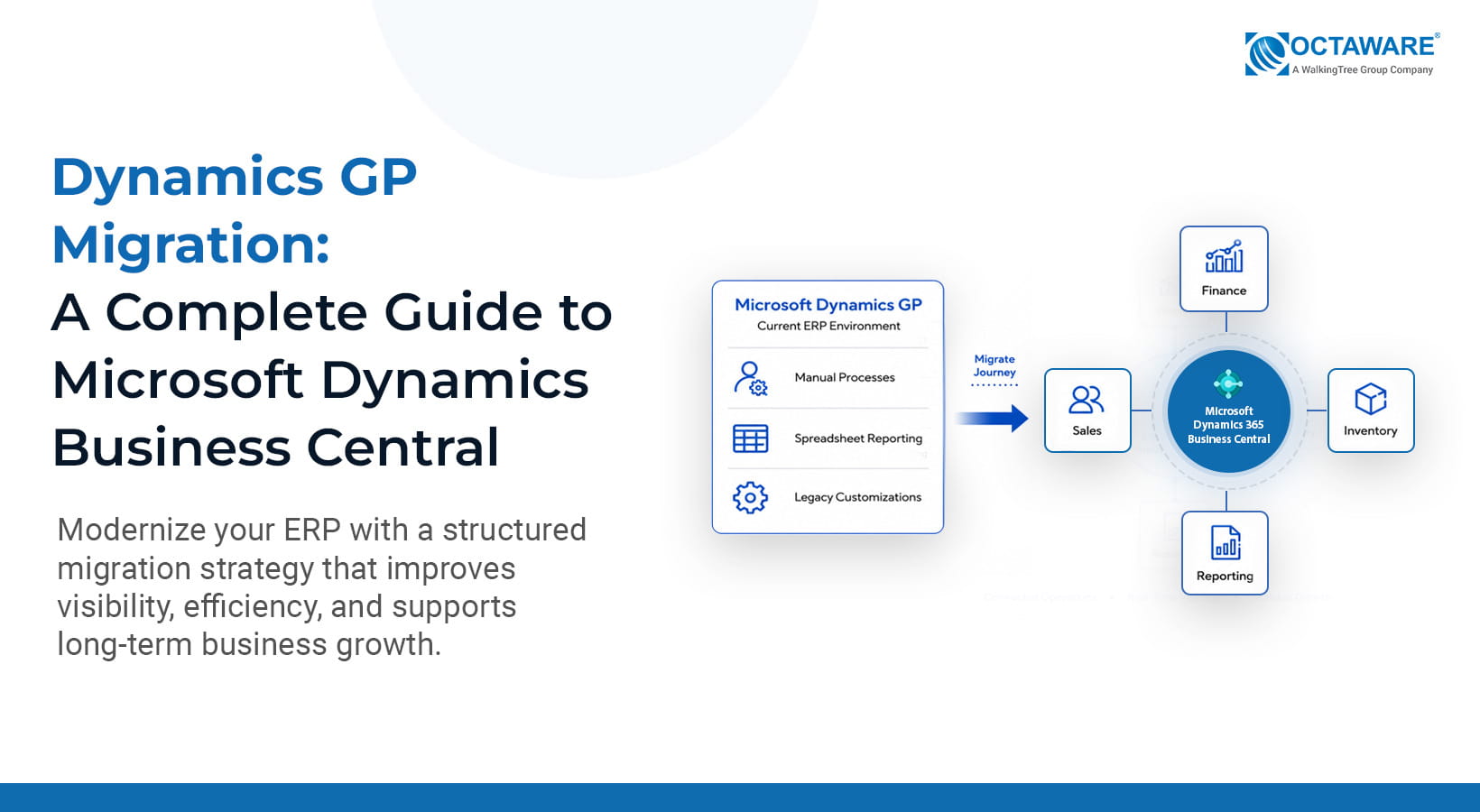
Imagine starting your Monday morning with your finance team pulling reports from Microsoft Dynamics GP, Excel spreadsheets, and multiple reporting tools just to reconcile the numbers. Operations are working around inventory limitations, sales relies on customer data from disconnected systems, and IT is still maintaining years-old GP customizations to support processes that have changed significantly over time. For many organizations, this is what a mature Dynamics GP environment looks like today.
For companies considering a Dynamics GP migration to Microsoft Dynamics Business Central, the decision is about more than replacing an ERP system. It is an opportunity to simplify business processes, reduce technical debt, improve reporting and operational visibility, strengthen integration across business applications, and build a more scalable ERP environment. It also provides an opportunity to improve data quality, reassess legacy customizations and integrations, and align the ERP with the organization’s future growth.
A successful Dynamics GP migration requires more than transferring data. It starts with assessing the current GP environment and determining what should move forward into Business Central. This includes evaluating data, customizations, integrations, and business processes, followed by solution design, testing, user preparation, and a controlled go-live. In this complete guide, we’ll walk through the key stages of a Dynamics GP to Business Central migration, from assessment and data preparation to customization decisions, integration planning, testing, user readiness, and post-migration support.
Why Businesses Are Choosing Dynamics GP Migration
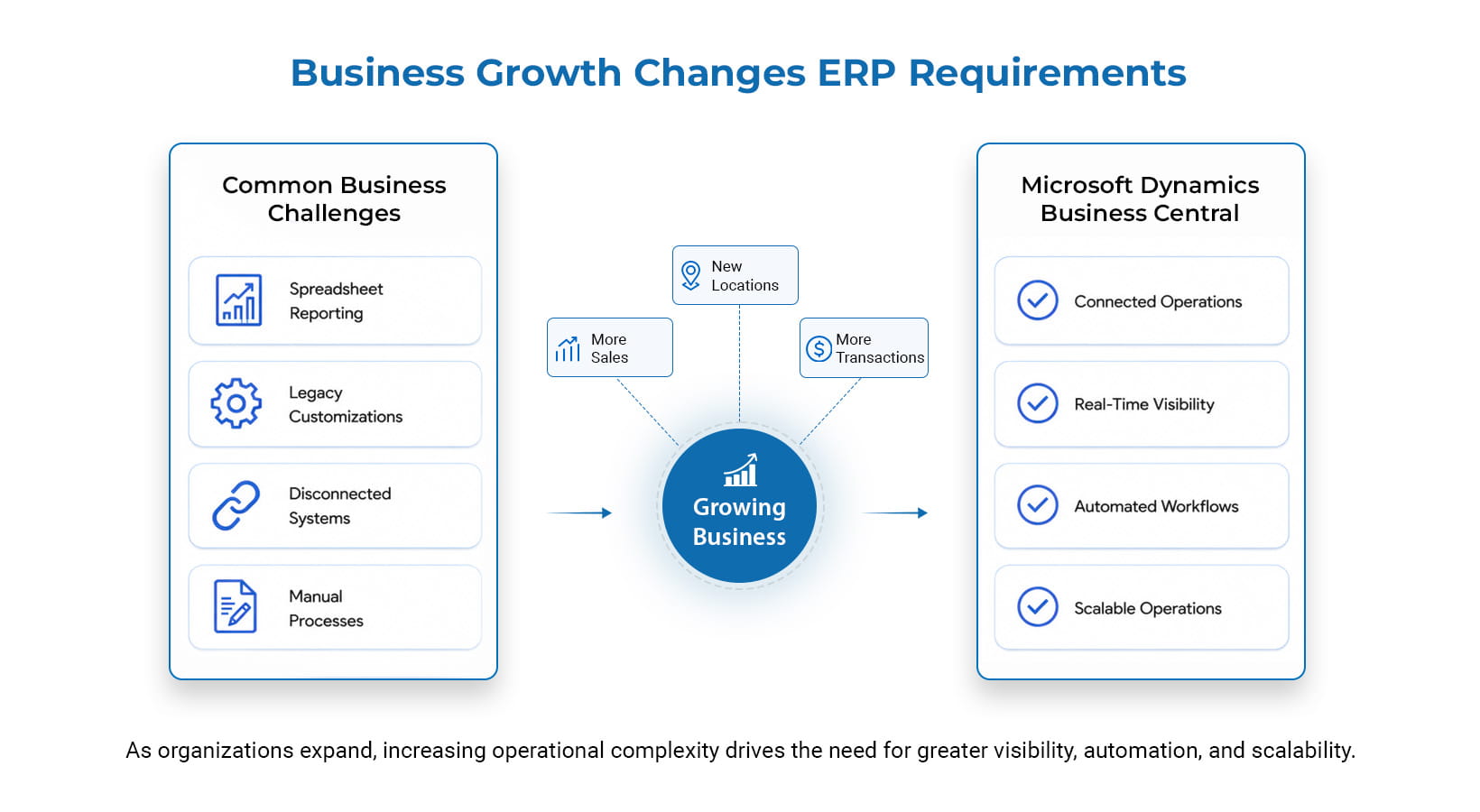
Many organizations begin evaluating a Dynamics GP migration not because GP has stopped working, but because the ecosystem around it has become increasingly complex. Years of customizations, third-party integrations, spreadsheets, manual workarounds, and disconnected reporting can make everyday processes harder to manage. As requirements evolve, this complexity can affect reporting, data visibility, integration, and scalability.
Several factors commonly influence the decision to move to Microsoft Dynamics Business Central:
- Cloud accessibility: Organizations running GP on traditional on-premises infrastructure may have users who depend on office-based access or VPNs. Business Central Online provides web-based access, making it easier for authorized users to work with business applications across locations without relying on the same on-premises infrastructure.
- Connected applications: GP environments can accumulate separate tools for email, collaboration, reporting, and business processes. Business Central integrates with Microsoft 365, Teams, Power BI, and Power Platform, helping organizations connect business data and reduce reliance on disconnected systems and point-to-point integrations.
- Automation: Manual approvals, follow-ups, data entry, and spreadsheet-based processes can become common workarounds in mature GP environments. Business Central supports workflows and automation that can help reduce repetitive tasks across finance, purchasing, sales, and operations.
- Reporting and visibility: When GP data is regularly exported into Excel or other reporting tools, teams may spend significant time consolidating information before they can act on it. Business Central, together with Power BI, can provide more connected financial and operational reporting, helping decision-makers access timely information.
- Scalability: As GP customers add entities, locations, business processes, or integrations, the surrounding environment can become increasingly complex. Business Central provides a cloud-based platform that can support business growth while allowing organizations to modernize processes, integrations, and extensions rather than continuing to expand legacy customizations.
Together, these capabilities can simplify the technology landscape, not just replace GP.
Should You Migrate from Dynamics GP Now?
Dynamics GP’s support timeline does not mean every organization needs to migrate immediately. The right timing depends on your business priorities, current GP environment, customization and integration complexity, operating costs, growth plans, and readiness for modernization.
Migration may make sense sooner if your organization is experiencing:
- Increasing reliance on spreadsheets and manual workarounds
- Growing customization or integration complexity
- Rising infrastructure or support costs
- Difficulty maintaining reliable reporting
- Expansion into new entities, locations, or markets
- A need for stronger cloud and Microsoft 365 integration
- Difficulty finding resources with the required GP expertise
The Hidden Cost of Delaying a Dynamics GP Migration
Continuing with Dynamics GP may seem like the lower-cost option when the system still handles core financial and operational processes. However, the total cost of maintaining an existing ERP can extend well beyond software and infrastructure expenses.
Organizations may also spend significant time and resources managing:
- Legacy customizations and third-party applications
- On-premises infrastructure and maintenance
- Manual reporting and spreadsheet-based processes
- Point-to-point integrations
- Data reconciliation between disconnected systems
- Specialized resources required to maintain older GP environments
These costs can become more significant as the organization adds new entities, locations, products, customers, or business processes.
For example, imagine a wholesale distributor operating across multiple warehouse locations. If each warehouse maintains separate spreadsheets for inventory reporting, finance may need to reconcile them before management can obtain a reliable consolidated view. Business Central can provide a more connected environment, but the benefit depends on how effectively the organization redesigns processes, integrates systems, and prepares data.
The cost of delaying migration extends beyond ERP and infrastructure expenses to productivity, reporting, integration, and future scalability.
Why Organizations Are Prioritizing Dynamics GP Migration
Microsoft’s published lifecycle policy is an important factor for organizations planning their next ERP strategy. For the current Dynamics GP 18.x release, Microsoft states that support for product enhancements, regulatory and tax updates, and technical support will end on December 31, 2029. Security updates and patches, if needed, will be available through April 30, 2031. Organizations therefore have time to plan their transition, but starting early can provide greater flexibility to assess their GP environment, address customizations and integrations, prepare data, and complete testing before support ends.
The potential business value of modernization is also supported by a March 2026 Forrester Total Economic Impact™ (TEI) study commissioned by Microsoft. Based on interviews with four business decision-makers, Forrester modeled a fictitious composite organization and projected more than 200% ROI over three years, an estimated $460,000 net present value (NPV), and potential payback in six months. These are modeled, risk-adjusted outcomes for the composite organization and should not be interpreted as guaranteed results for every Business Central customer.
A Practical Dynamics GP Migration Framework
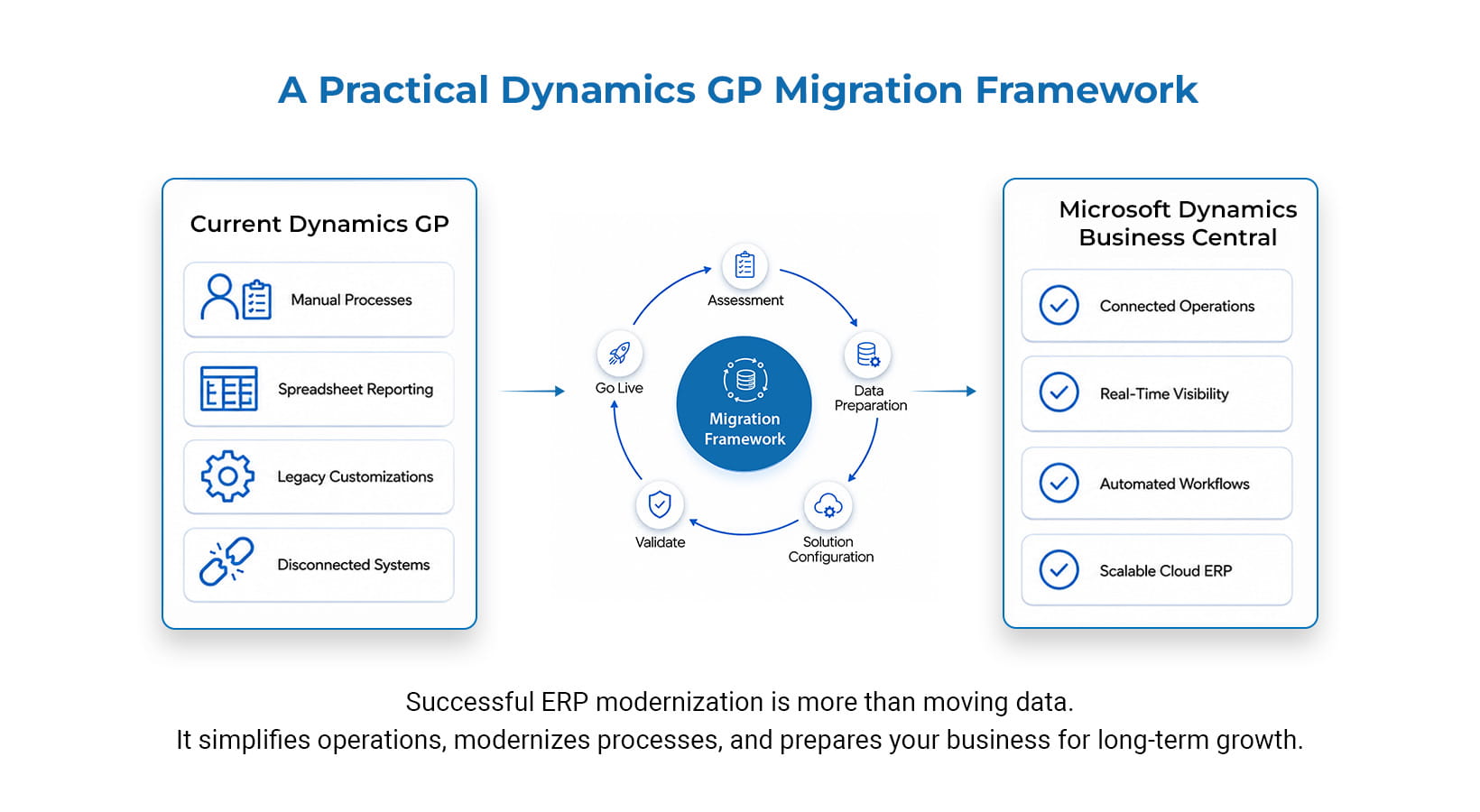
A Dynamics GP migration to Microsoft Dynamics Business Central is more than a technical data transfer. The objective should not be to recreate the existing GP environment in Business Central exactly as it is today. Instead, migration provides an opportunity to evaluate what the business needs going forward and determine what should be retained, redesigned, replaced, or retired. This can help simplify processes, reduce unnecessary technical debt, improve data quality, and ensure that customizations and integrations support current business requirements rather than simply carrying legacy complexity into the new ERP.
A structured migration typically follows these stages:
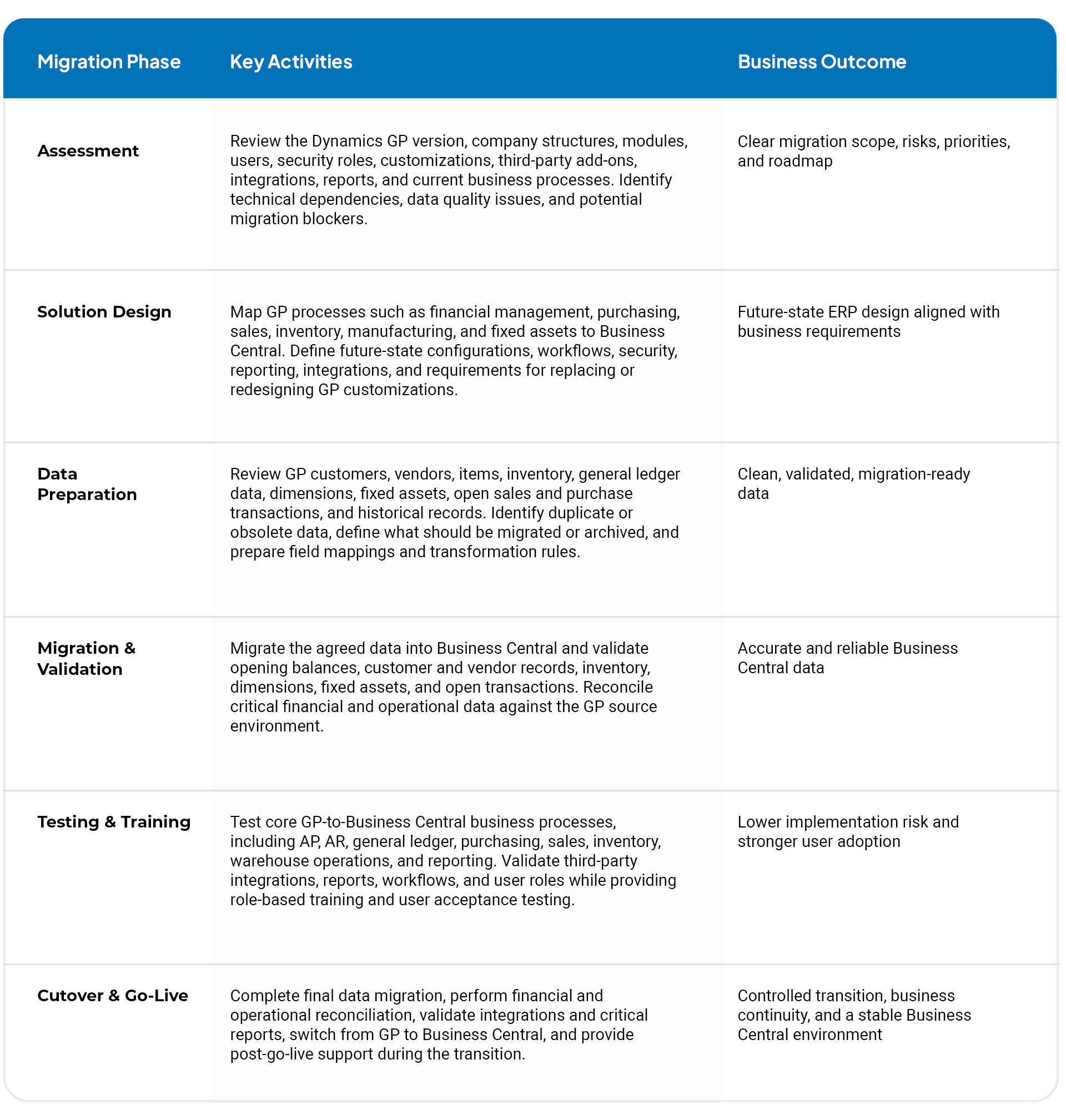
The exact sequence and scope will vary by organization. Businesses with extensive customizations, complex integrations, multiple entities, or significant historical-data requirements may need additional assessment, testing, and migration cycles.
What Happens to Your Data During a Dynamics GP Migration?
Data migration is a critical part of a Dynamics GP to Business Central migration, but migration does not mean moving everything. The goal is to determine what data the business needs for day-to-day operations, what should be cleansed or transformed before migration, what should be retained for reporting or reference, and what can be archived. These decisions should be based on operational requirements, financial and management reporting, audit and compliance needs, data quality, and the organization’s historical-data requirements. A clear data strategy helps ensure that Business Central receives accurate, relevant data without carrying unnecessary legacy information into the new environment.
Typical data considerations include:
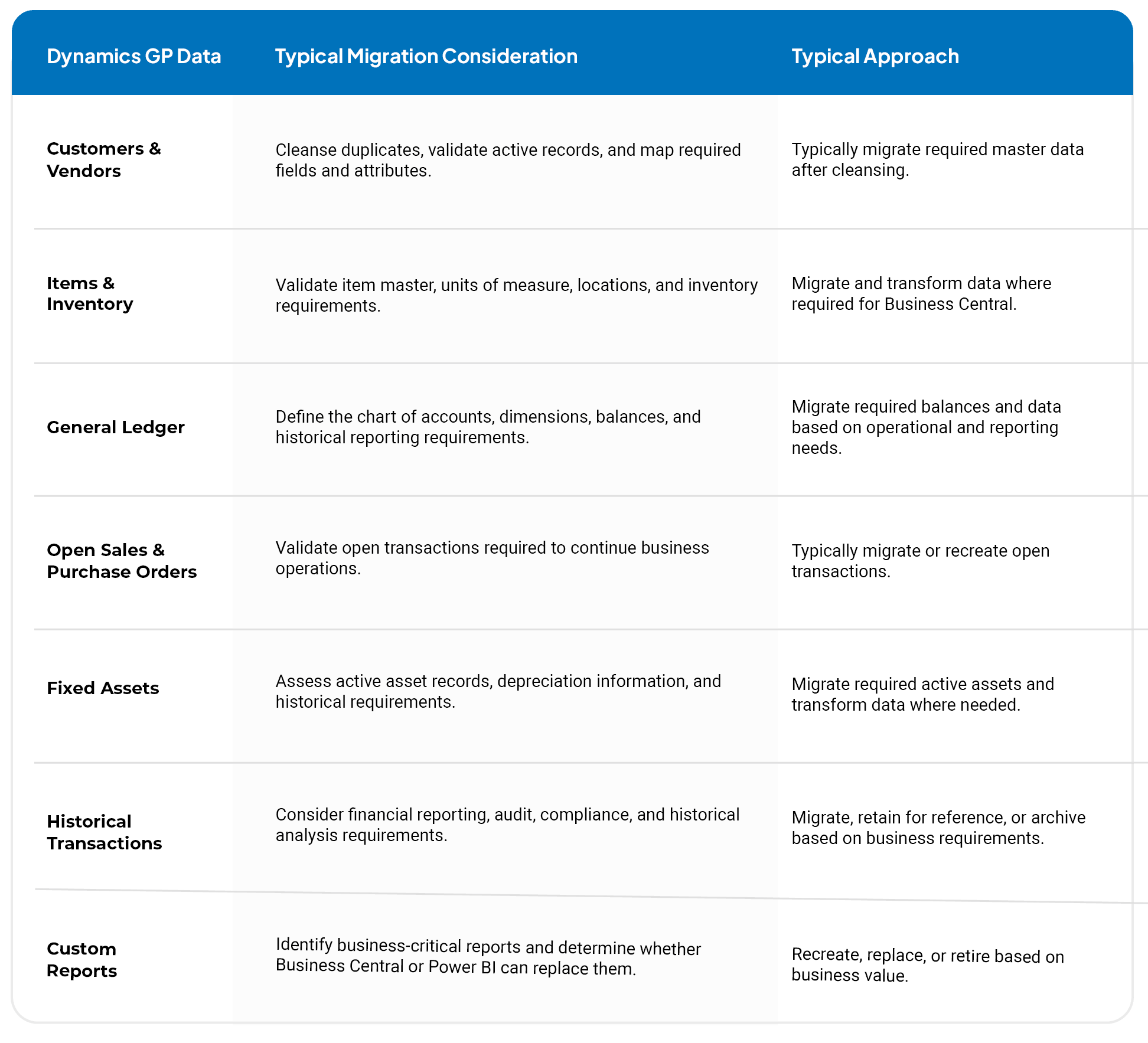
Data should also be reconciled after migration. Financial balances, customer and vendor records, inventory information, open transactions, and other critical data should be validated against the source system before go-live.
Should You Migrate Every Customization During a Dynamics GP Migration?
The short answer is no. Over the years, organizations often accumulate custom reports, integrations, SQL scripts, workflows, and third-party applications around their Dynamics GP environment. A Dynamics GP migration is an opportunity to reassess whether each customization still provides business value rather than automatically carrying it into Business Central.
A simple decision framework can help:
- Retain: Keep customizations that remain business-critical and are not adequately addressed by standard Business Central capabilities.
- Redesign: Rework processes where the business requirement remains important but the existing GP customization is no longer the best approach.
- Replace: Use standard Business Central functionality, Power Platform, or appropriate extensions where they can deliver the required capability with less maintenance.
- Retire: Remove customizations that support outdated processes, duplicate standard functionality, or no longer provide meaningful business value.
For example, a manufacturer using a customized approval workflow in Dynamics GP may find that Business Central workflows or Power Platform capabilities can support the same requirement with a more maintainable approach. The goal is not to migrate legacy complexity simply because it already exists in GP. It is to carry forward what the business needs while simplifying everything else.
How Long Does a Dynamics GP Migration Take?
There is no standard timeline for a Dynamics GP to Business Central migration. The duration depends on the complexity of the existing GP environment, including data quality, number of entities and users, customizations, integrations, historical data requirements, testing, and stakeholder availability.
The following ranges are illustrative planning estimates only, not fixed or guaranteed project timelines:
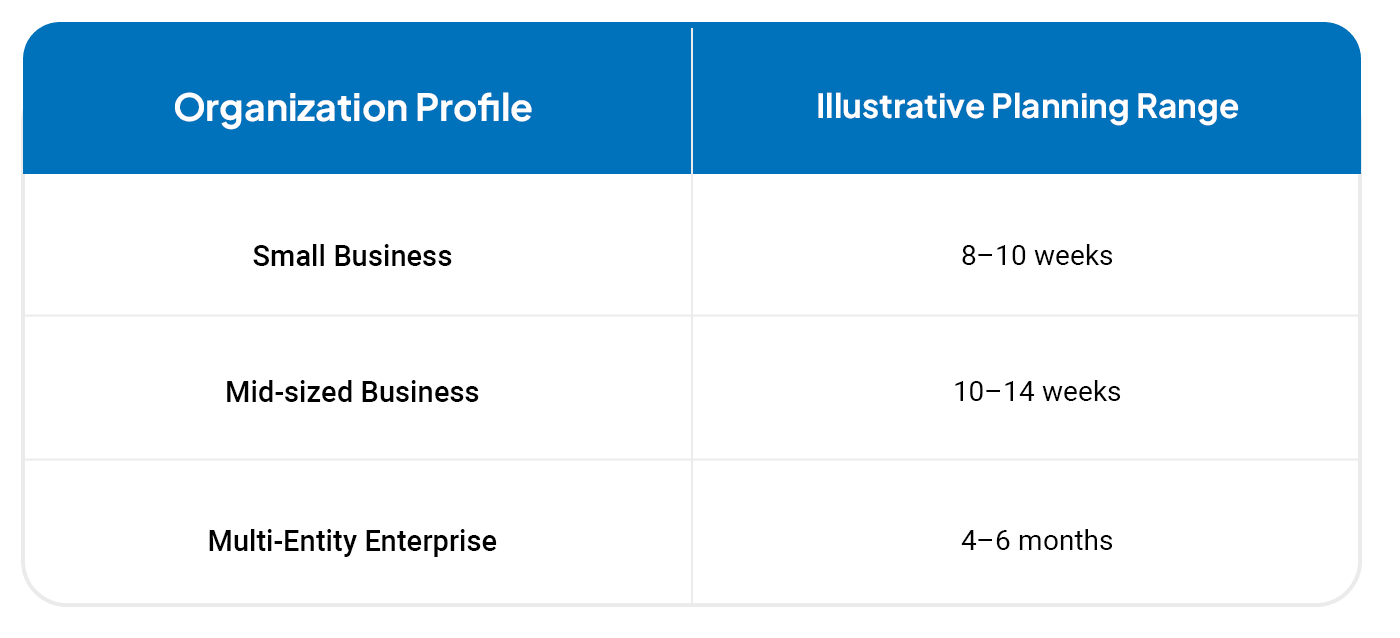
Organizations with extensive GP customizations, complex integrations, poor data quality, multiple entities, significant historical-data requirements, or additional testing needs may require more time. A detailed assessment of the current GP environment is the best way to establish a realistic migration timeline.
Dynamics GP vs. Microsoft Dynamics Business Central
Every organization’s requirements are different, but comparing the platforms can help clarify the differences when evaluating an ERP modernization strategy.
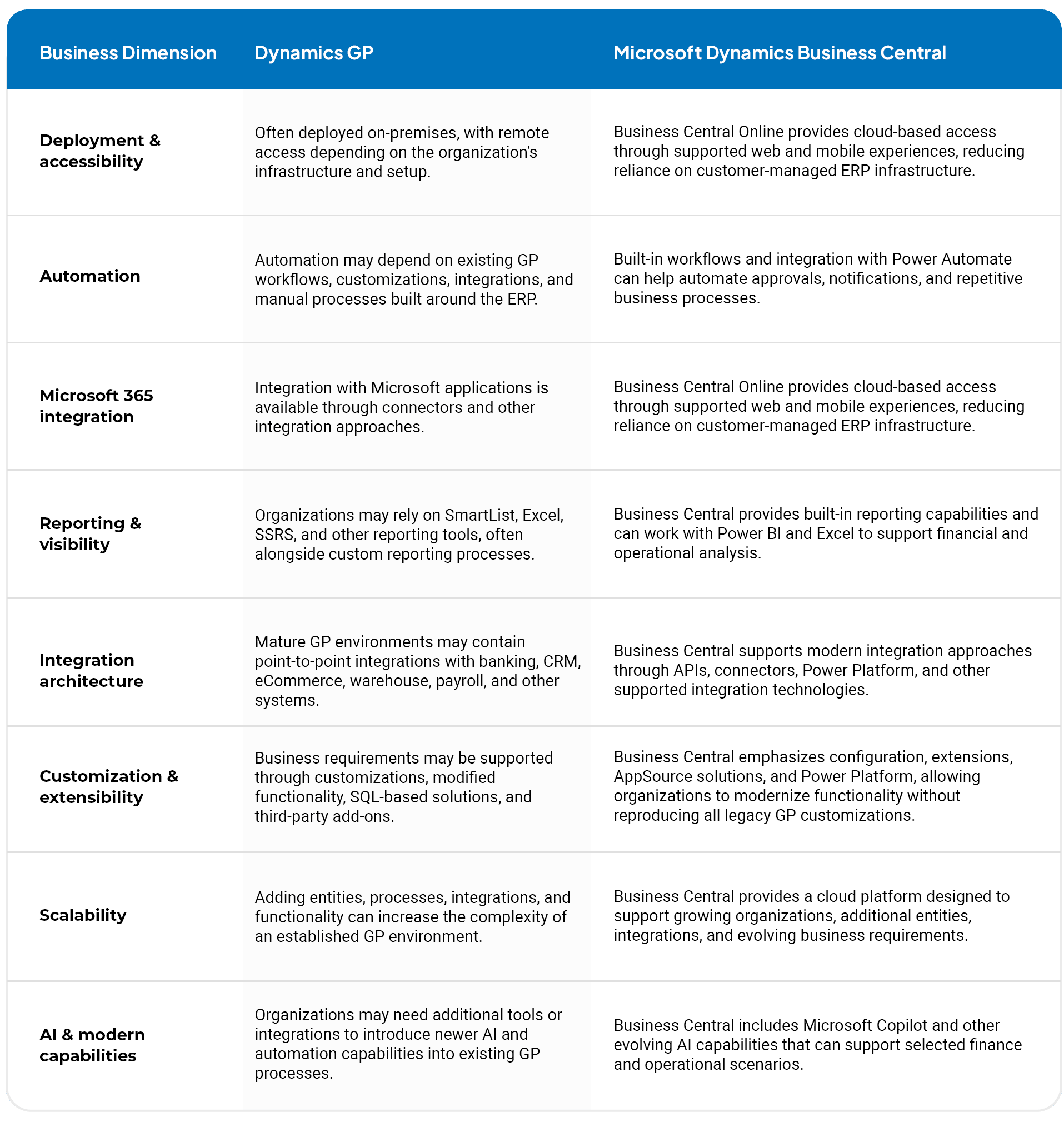
The right choice depends on the organization’s processes, industry requirements, existing technology landscape, data, integrations, and long-term ERP strategy. Business Central may provide a more modern platform for organizations seeking cloud-based ERP and closer integration with Microsoft’s business applications.
Why Choose Octaware for Your Dynamics GP Migration
At Octaware Technologies, we bring more than two decades of experience delivering solutions across the Microsoft ecosystem, with expertise spanning Dynamics GP, Dynamics NAV, Business Central, Dynamics 365, Power Platform, Microsoft 365, and Azure. As a Microsoft partner, Octaware combines functional and technical expertise to help organizations assess legacy ERP environments and plan their modernization journey.
For organizations planning a Dynamics GP migration, our approach covers the areas that can have the greatest impact on migration success, including business processes, data, customizations, third-party solutions, integrations, reporting, solution design, testing, and post-go-live support. Octaware also provides Business Central implementation, customization, integration, migration, and support services, helping organizations address their migration journey through a connected Microsoft business application strategy.
The objective is to help organizations determine what should be retained, redesigned, replaced, or retired while developing a practical roadmap aligned with their business requirements and future growth.
Start Your Dynamics GP Migration with Confidence
A successful Dynamics GP migration to Microsoft Dynamics Business Central starts with understanding your current ERP environment and defining what your organization actually needs from its next platform.
Before making the transition, assess your data, customizations, integrations, reporting requirements, and business processes. A structured approach can help identify migration priorities, potential risks, and the level of effort required.
Ready to assess your Dynamics GP environment? Talk to Octaware’s experts to discuss your requirements and develop a practical migration roadmap for Business Central.