
Picture this: your team has just gotten sign-off on a Dynamics NAV migration to Microsoft Dynamics Business Central. The budget is approved, the timeline looks reasonable, and everyone is ready to move forward. A few weeks into implementation, someone finds a decade-old custom pricing module nobody documented, a warehouse scanning integration nobody realized was business-critical, and a set of reports finance can’t close the books without. A straightforward Dynamics NAV migration suddenly turns into a longer, more expensive project full of surprises nobody planned for.
This isn’t unusual. Before moving to Microsoft Dynamics Business Central, organizations need to understand what they have today, what still supports the business, and what may create challenges during modernization. How customized is your Dynamics NAV environment? Which integrations are still business-critical? How clean is your data, and what should not be migrated at all? These questions can significantly affect the timeline, cost, and complexity of a Dynamics NAV migration. A structured ERP assessment answers them before implementation begins, replacing uncertainty with a practical modernization roadmap built on the specifics of your environment rather than assumptions.
| Why an ERP Assessment Matters Before a Dynamics NAV Migration
Many organizations have been running Dynamics NAV for years, and the environment has typically evolved alongside the business. New modules get added, customizations get developed, third-party applications become part of daily operations, and integrations connect NAV with CRM, banking, eCommerce, warehouse, and payroll systems. Over time, the ERP becomes more than a software platform. It becomes a combination of standard functionality, custom development, historical data, and business process, and that is why a migration should start with understanding the current environment rather than immediately designing the new one. This distinction is what separates successful ERP modernization from a rushed technical swap.
Microsoft’s own migration guidance for moving Dynamics NAV to Business Central includes assessment, data preparation, customization conversion, migration, validation, and post-migration activities. For organizations moving to Business Central Online specifically, Microsoft notes that C/AL customizations need to be converted to AL extensions, which makes customization analysis an essential part of migration planning rather than an afterthought.
Consider a distributor that has used Dynamics NAV for more than a decade. Finance depends on customized reports, procurement runs on approval workflows, warehouse teams rely on a third-party scanning solution, and sales has an integration with an eCommerce platform. Simply moving the database doesn’t guarantee the new ERP will support any of this. An assessment brings business and IT stakeholders together to understand how work actually gets done before anyone touches a migration plan.
| What a Dynamics NAV Migration Assessment Actually Tells You
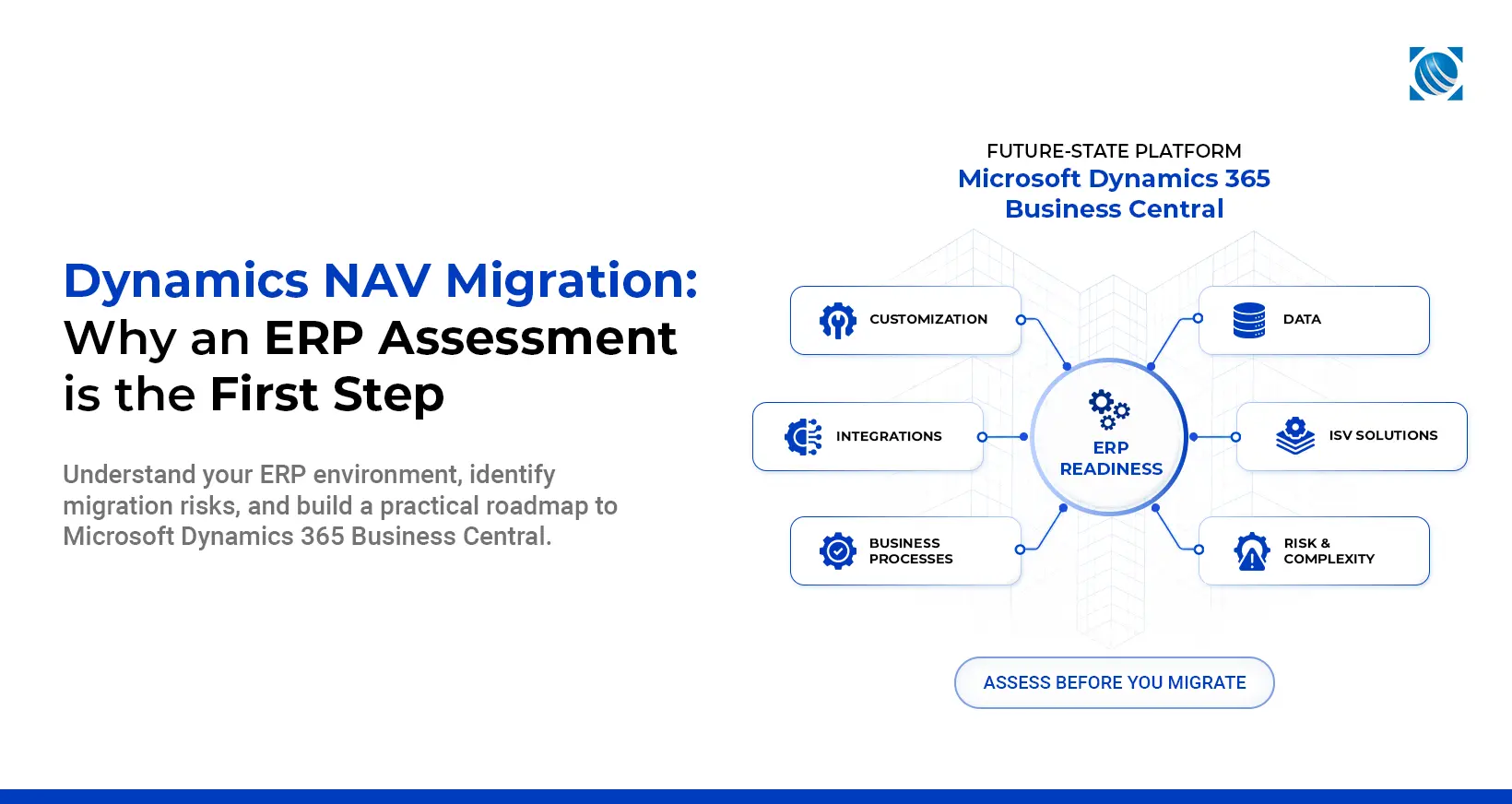
An ERP assessment answers a simple but important question: what will it really take to move from Dynamics NAV to Business Central? That requires more than reviewing the ERP version. A comprehensive assessment looks at the current NAV version and technical environment, including database architecture, SQL Server, multi-company configuration, security, user roles, performance considerations, and scheduled processes, alongside business processes and modules, custom objects, third-party ISV solutions, integrations, reporting, data quality, and where Business Central fits and where the gaps are.
The result is a clearer picture of the organization’s modernization readiness. Instead of leadership asking only “how much will migration cost,” they can ask a more useful question: what exactly are we migrating, why are we migrating it, and what can we improve along the way?
| Five Consultant-Led Discovery Workshops
The assessment is delivered through five structured, consultant-led discovery sessions involving business and IT stakeholders. These sessions are designed to build a complete picture of the existing Dynamics NAV environment before modernization planning begins.
The workshops typically cover:
- Business Process Review: Finance and accounting, procure-to-pay, order-to-cash, inventory, warehouse operations, manufacturing where applicable, supply chain, project accounting, fixed assets, service management, and CRM touchpoints.
- Technical Landscape Assessment: NAV version and environment, SQL Server, database architecture, multi-company configuration, security, user roles, performance considerations, batch jobs, scheduled processes, and other technical dependencies.
- Customization Assessment: Custom objects, modified functionality, custom forms and reports, code modifications, extensions, source-code availability, dependencies, and potential modernization blockers.
- ISV and Integration Review: Third-party solutions, payment and shipping systems, EDI, payroll, tax, document management, warehouse solutions, CRM, eCommerce, banking, Power BI, APIs, and legacy integrations.
- Data, Reporting, and Future-State Review: Master data quality, historical transactions, reporting requirements, migration priorities, data cleansing, Business Central fit-gap considerations, and future-state requirements.
The findings from these sessions provide the foundation for the assessment report, modernization roadmap, and budgetary guidance.
| Dynamics NAV Migration: What Happens to Your Customizations?
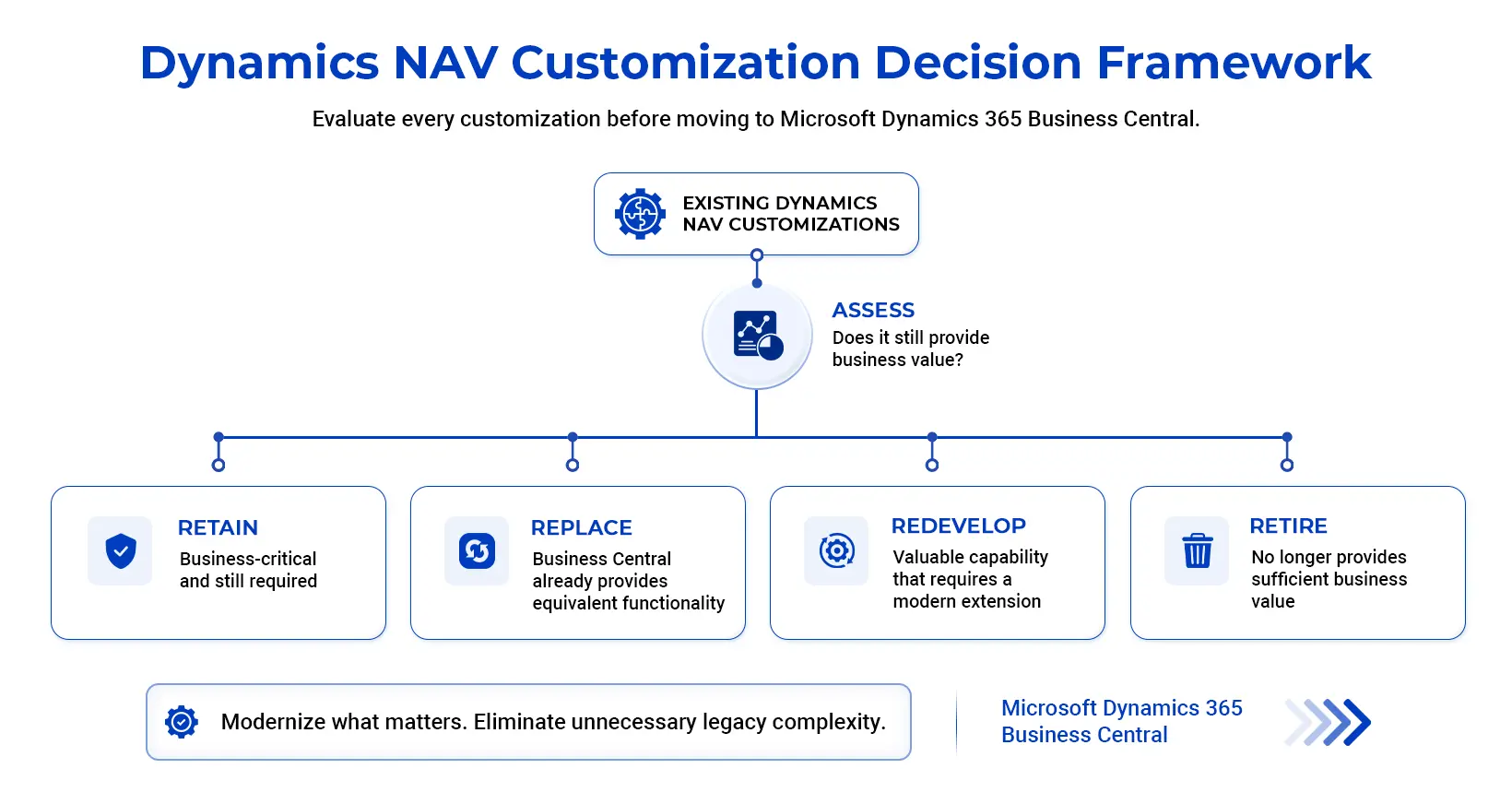
Customizations are usually the biggest variable in a Dynamics NAV migration. Organizations accumulate years of modified objects, custom reports, C/AL code, and custom forms, and the question isn’t how to move every customization. It’s which ones still provide business value. Each customization can be evaluated and placed into one of four categories.
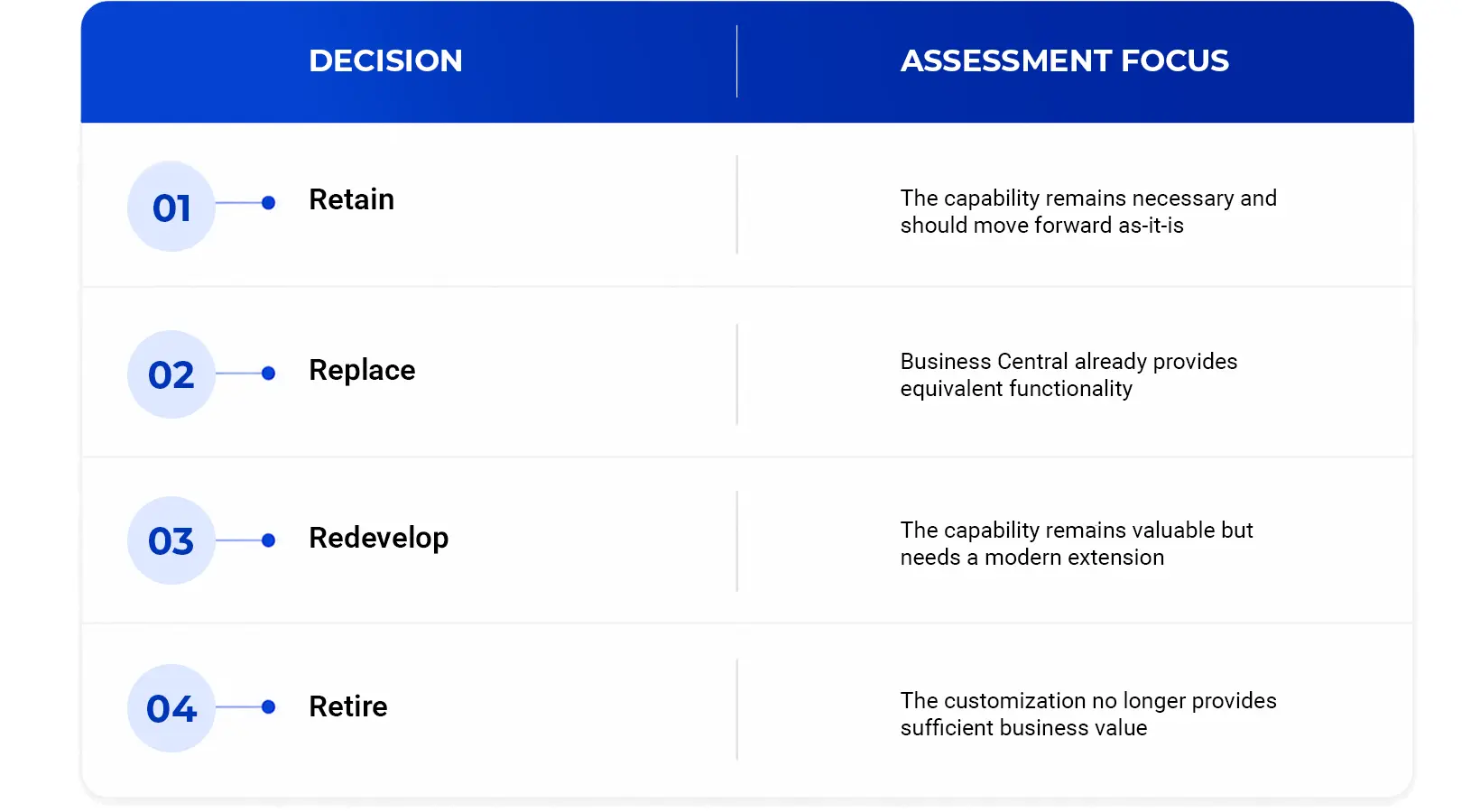
The assessment also weighs each customization’s business criticality, source code availability, and dependencies to determine how much effort modernizing it would actually take.
Microsoft’s current migration guidance makes this especially relevant for organizations moving to Business Central Online, since C/AL customizations must be converted to AL extensions and data tied to customized tables requires appropriate handling. Microsoft recommends planning the extension roadmap, piloting conversions, and running regression testing before migration, and an assessment identifies these requirements before they become implementation surprises.
| Evaluating ISVs and Integrations for Your Dynamics NAV Migration
Most mature Dynamics NAV environments depend on more than the ERP itself, from payment gateways and tax engines to warehouse management systems, CRM platforms, Power BI, and custom APIs. During an assessment, each dependency gets evaluated: is it still required, does Business Central already provide the capability, is there a modern AppSource alternative, and should the integration be rebuilt or replaced with Power Platform instead? This exercise often reveals opportunities to reduce technical debt, and it prevents a common migration problem: discovering a critical integration only after implementation has already started. In many environments, two or three of these dependencies turn out to be more business-critical than anyone had documented.
The assessment documents these findings in an ISV and third-party solution inventory, including Business Central compatibility, supported or replacement solutions, recommended modernization or upgrade paths, and the potential business impact of each dependency. This provides stakeholders with a clear view of which ISV solutions can move forward, which may need to be replaced, and which may require a different modernization approach.
| Data Migration Is About Quality, Not Quantity
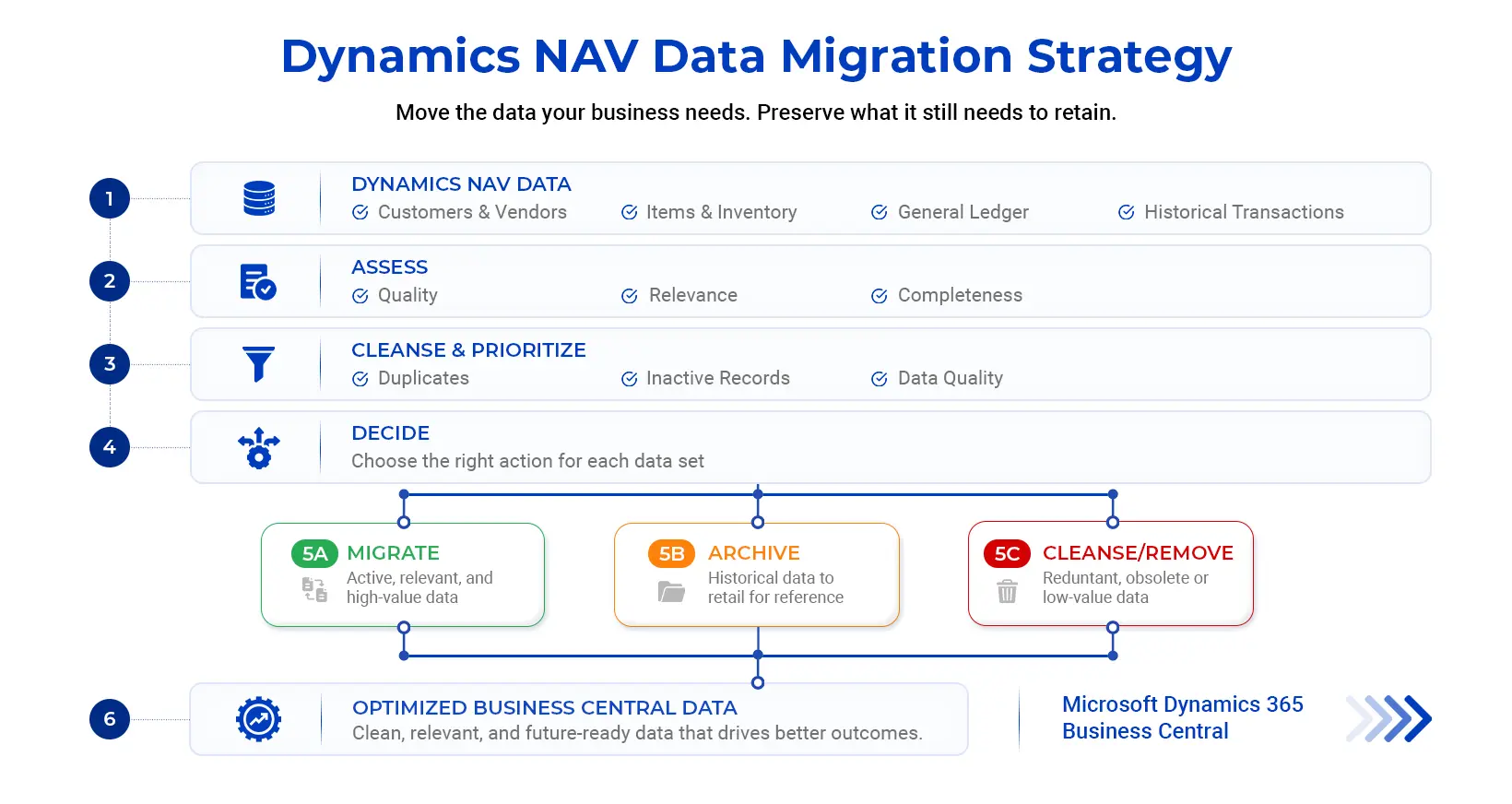
A business might have fifteen years of transactions stored in Dynamics NAV, but that doesn’t mean fifteen years of data should move into Business Central. A data migration strategy should determine what information the business actually needs.
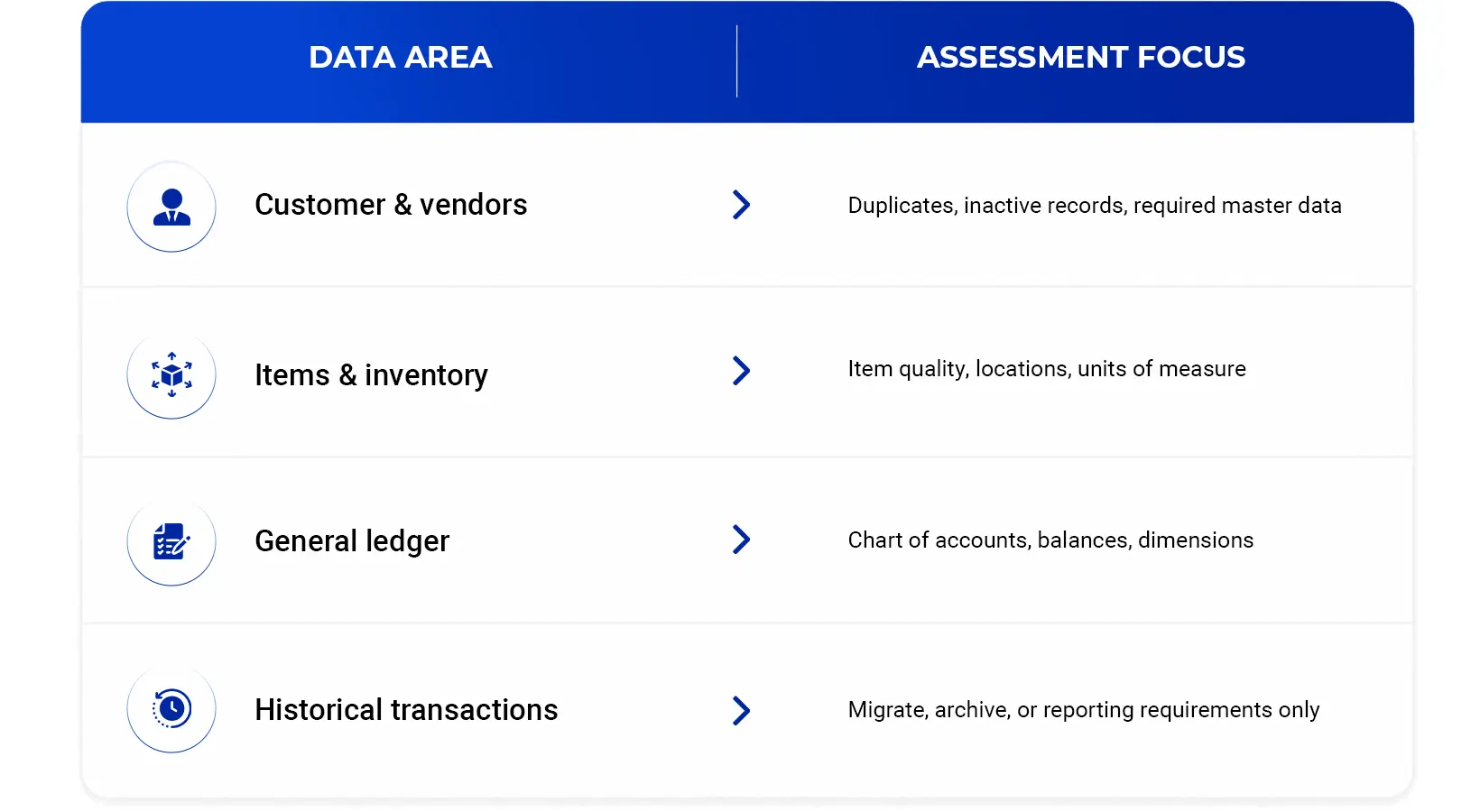
Data cleansing should happen before migration, not after users begin working in the new system. Microsoft’s own documentation recommends preparing data and reducing technical debt before cloud migration, including archiving obsolete history and validating the source environment. A manufacturer, for example, may discover during assessment that thousands of inactive item records have accumulated in NAV. Migrating every one of them makes the new system harder to manage without adding business value; cleansing active master data while archiving the rest is usually the better strategy.
| Why an ERP Assessment Reduces Dynamics NAV Migration Risk
Every migration carries some uncertainty, and an assessment makes that uncertainty visible early rather than late. A structured assessment can surface unsupported customizations, complex integrations, poor-quality master data, localization requirements, and potential upgrade blockers before they turn into implementation surprises. Complexity is evaluated across multiple dimensions, including functional complexity, technical complexity, customization effort, integration effort, data migration effort, and change management impact. That also makes budgeting more realistic, since organizations can plan around actual complexity instead of estimating based only on user or company counts.
This isn’t a theoretical risk. Panorama Consulting Group’s 2026 ERP Report found that more than a quarter of organizations exceeded their ERP project budgets, most often because unexpected technology needs surfaced mid-project instead of during planning. Assessing the environment upfront is what closes that gap.
| From ERP Assessment to Your Dynamics NAV Migration Roadmap
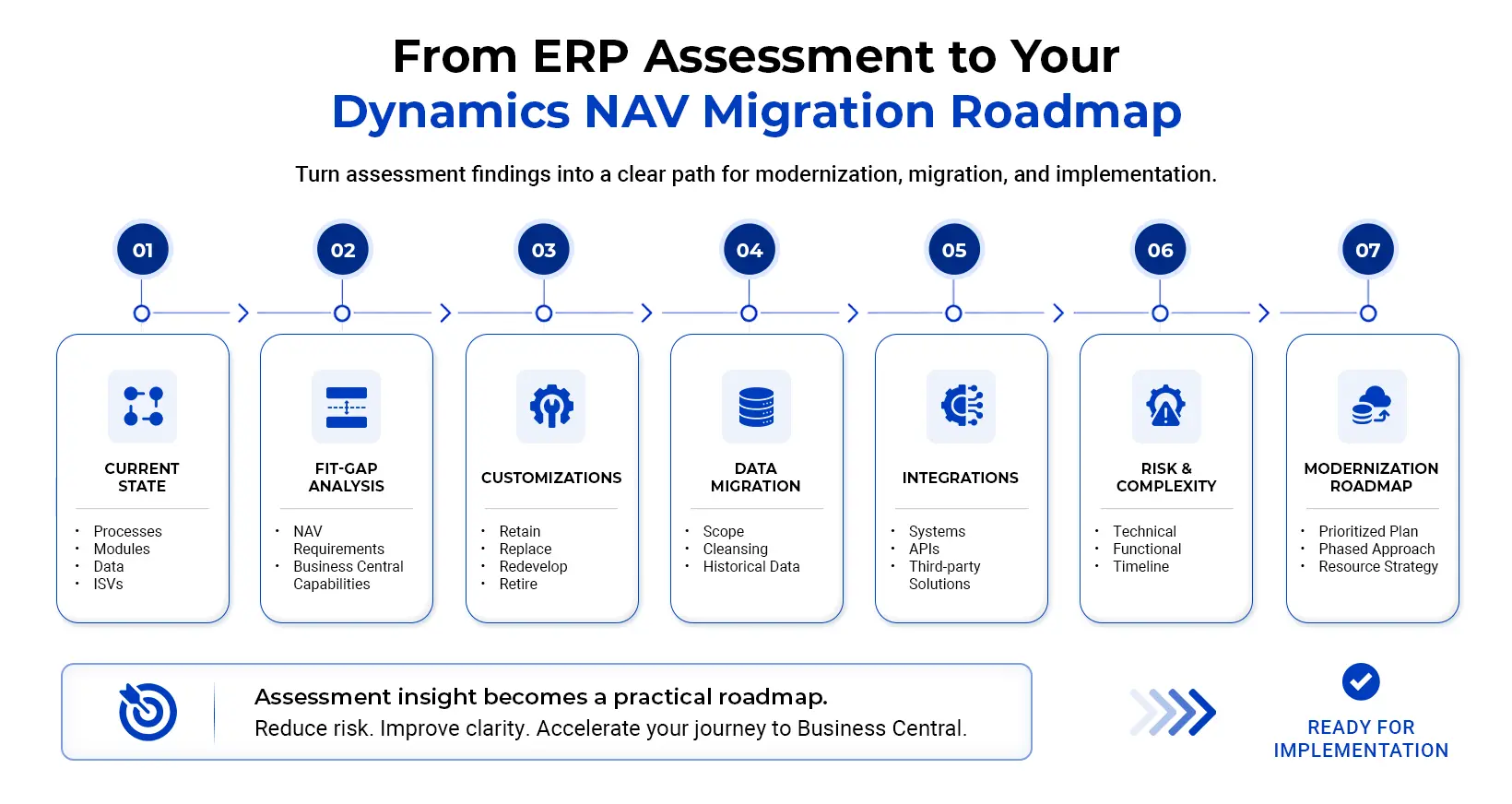
The purpose of an assessment isn’t to produce a report and stop there. It should create a practical path forward.
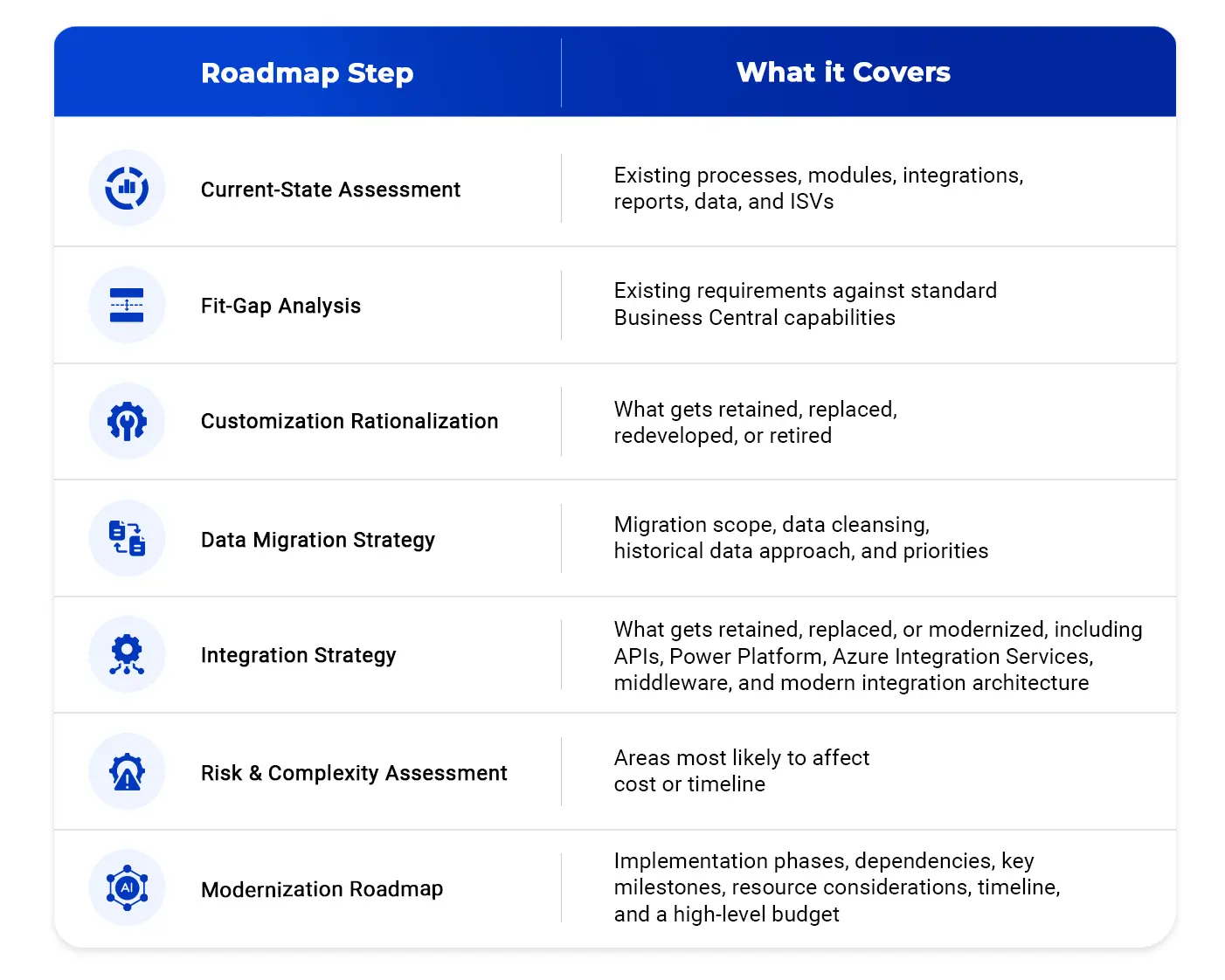
This gives leadership a more realistic basis for planning. The budgetary estimate is based on assessed scope, complexity, customizations, integrations, and data migration effort rather than a generic per-user or per-company rate.
| Why a Dynamics NAV Migration Should Plan for an Evolving Business Central
The destination platform is changing too. Microsoft’s ongoing Business Central release waves continue to expand capabilities across finance, supply chain, manufacturing, reporting, Power Platform integration, and AI through Copilot. That means organizations shouldn’t automatically recreate everything they currently do in Dynamics NAV. A process that required custom development years ago may already have a standard or AI-assisted alternative today, and an assessment helps identify where the organization can take advantage of that instead of carrying legacy complexity into a modern ERP.
| What You Receive From a Comprehensive Dynamics NAV Migration Assessment
A well-structured assessment leaves the organization with more than technical documentation. Typical deliverables include an executive summary with a modernization readiness score, a current-state ERP assessment, business process review, customization inventory, integration and ISV analysis, a fit-gap analysis, a data migration strategy, a risk and complexity assessment, a modernization roadmap with budgetary guidance, and a Business Requirements Specification. This documentation becomes the foundation for implementation planning and partner discussions, and more importantly, it gives business leaders a shared understanding of what needs to happen next, well before any implementation contract is signed.
| Why Octaware Technologies for Dynamics NAV Migration
As a Microsoft Solutions Partner, Octaware Technologies brings expertise across Dynamics NAV, Dynamics GP, Business Central, Power Platform, and Azure, and approaches ERP modernization by first understanding the environment that already exists. Our assessment process combines functional and technical discovery across business processes, Dynamics NAV configurations, customizations, integrations, ISV solutions, reporting, security, and data. The objective isn’t simply to identify what needs to change. It’s to identify what should change, what should remain, and what can be simplified before moving to Business Central.
For organizations considering a Dynamics NAV migration, Octaware offers a Dynamics ERP Modernization Assessment, delivering this clarity through consultant-led discovery, analysis, and roadmap development. Contact the Octaware team to learn more about the assessment and pricing.
| Start Your Dynamics NAV Migration With Clarity
A successful Dynamics NAV migration doesn’t begin with moving data. It begins with understanding the business. Before selecting a migration approach, organizations should know their current ERP health, customization footprint, integration dependencies, data quality, and future-state priorities, and an ERP assessment brings all of that together into a documented current state, a clear picture of the gaps between NAV and Business Central, and a practical roadmap for modernization.
Ready to understand what your Dynamics NAV environment really requires? Start with an ERP assessment and build a clear roadmap for your move to Microsoft Dynamics Business Central. Contact the Octaware team to learn more about the assessment and pricing.