

Managing a real estate business involves more than overseeing properties and project finances. Teams need to manage property listings, coordinate sales activities, handle leasing agreements, maintain tenant and customer records, monitor project budgets, coordinate vendors, and track expenses across multiple developments. When these activities are spread across spreadsheets and disconnected applications, maintaining accurate information and gaining a clear picture of business performance becomes increasingly difficult.
ERP for real estate helps bring these financial and operational processes together, giving businesses better visibility into property management, leasing, sales activities, customer-related workflows, project costs, purchasing, cash flow, and overall financial performance.
Microsoft Dynamics 365 Business Central provides core capabilities for financial management, purchasing, fixed assets, and project accounting. When configured around industry requirements and connected with suitable applications, it can help real estate businesses establish more structured processes, manage business operations, and maintain consistent information across their operations.
This guide explores how ERP for real estate operations can work with Microsoft Dynamics 365 Business Central, the capabilities that matter most, and what organizations should consider before selecting and implementing a solution.
| Why Real Estate Businesses Need ERP for Real Estate Operations
Real estate operations extend beyond property sales and rental income. Developers coordinate project budgets, contractors, procurement, materials, and financial reporting. Property management companies may oversee multiple buildings, recurring expenses, vendor payments, and maintenance activities.
When these processes operate in separate systems, teams may spend time reconciling figures, updating spreadsheets, and preparing reports manually. Finance teams may not have timely project cost information, while management may find it difficult to compare financial performance across properties or business units.
A well-planned ERP for real estate can connect the financial and operational processes of a business, helping teams maintain consistent information across departments. Depending on the configuration, it can help organizations:
- Maintain consistent financial records across projects and business units.
- Track project budgets, expenses, and purchasing commitments.
- Standardize procurement and vendor payment processes.
- Monitor receivables, payables, and cash flow.
- Improve reporting and approval workflows.
- Reduce duplicate data entry between connected applications.
The goal is to establish processes that give teams reliable information and help management make informed decisions. An appropriate ERP for real estate solution should reflect the organization’s operating model rather than force every business into the same workflow.
| How ERP for Real Estate Works with Business Central
Microsoft Dynamics 365 Business Central provides a foundation for core business management processes. Its suitability depends on configuration, integrations, reporting needs, and the industry-specific requirements that must be addressed separately.
Businesses evaluating Microsoft ERP for real estate should assess how Business Central’s standard capabilities, industry-specific extensions, and integrations align with their operational requirements.
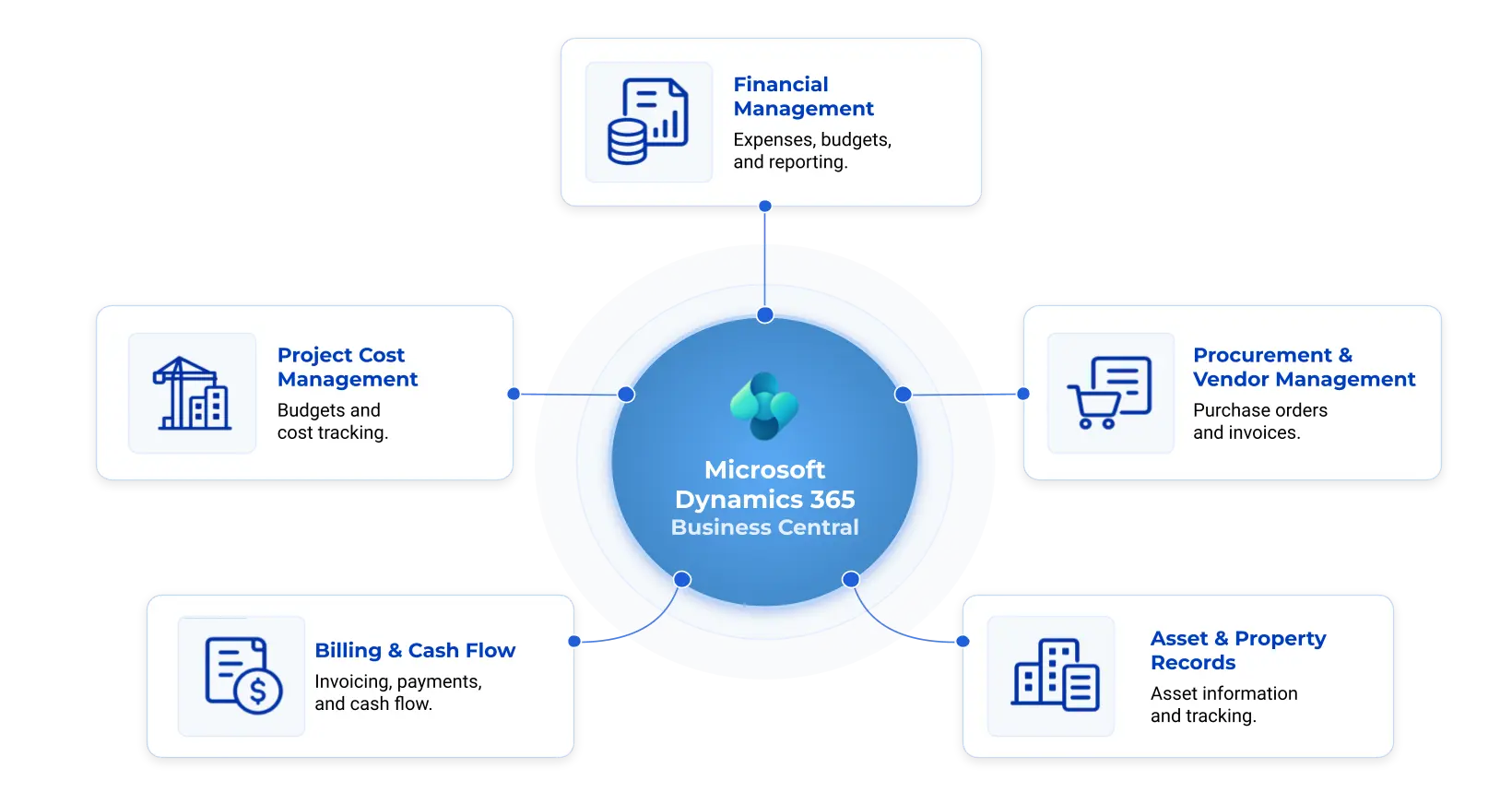
1. Financial Management and Reporting
Financial visibility is essential for organizations managing multiple properties, projects, or investment activities. Teams need to understand income, expenditure, liabilities, cash flow, and financial performance without depending entirely on manually consolidated reports.
Business Central supports general ledger management, accounts payable and receivable, bank reconciliation, budgeting, and financial reporting. These capabilities can help finance teams maintain structured records and review performance through consistent reports.
For real estate businesses, suitable configuration can support analysis by project, property, department, or other relevant categories. This helps decision-makers identify cost variations and compare financial results across operations.
Businesses evaluating real estate accounting software should assess reporting requirements, tax considerations, approval processes, and consolidation needs. Detailed lease accounting, property-specific reporting, and specialized financial calculations may require additional configuration or connected applications.
2. Real Estate Project Cost Management
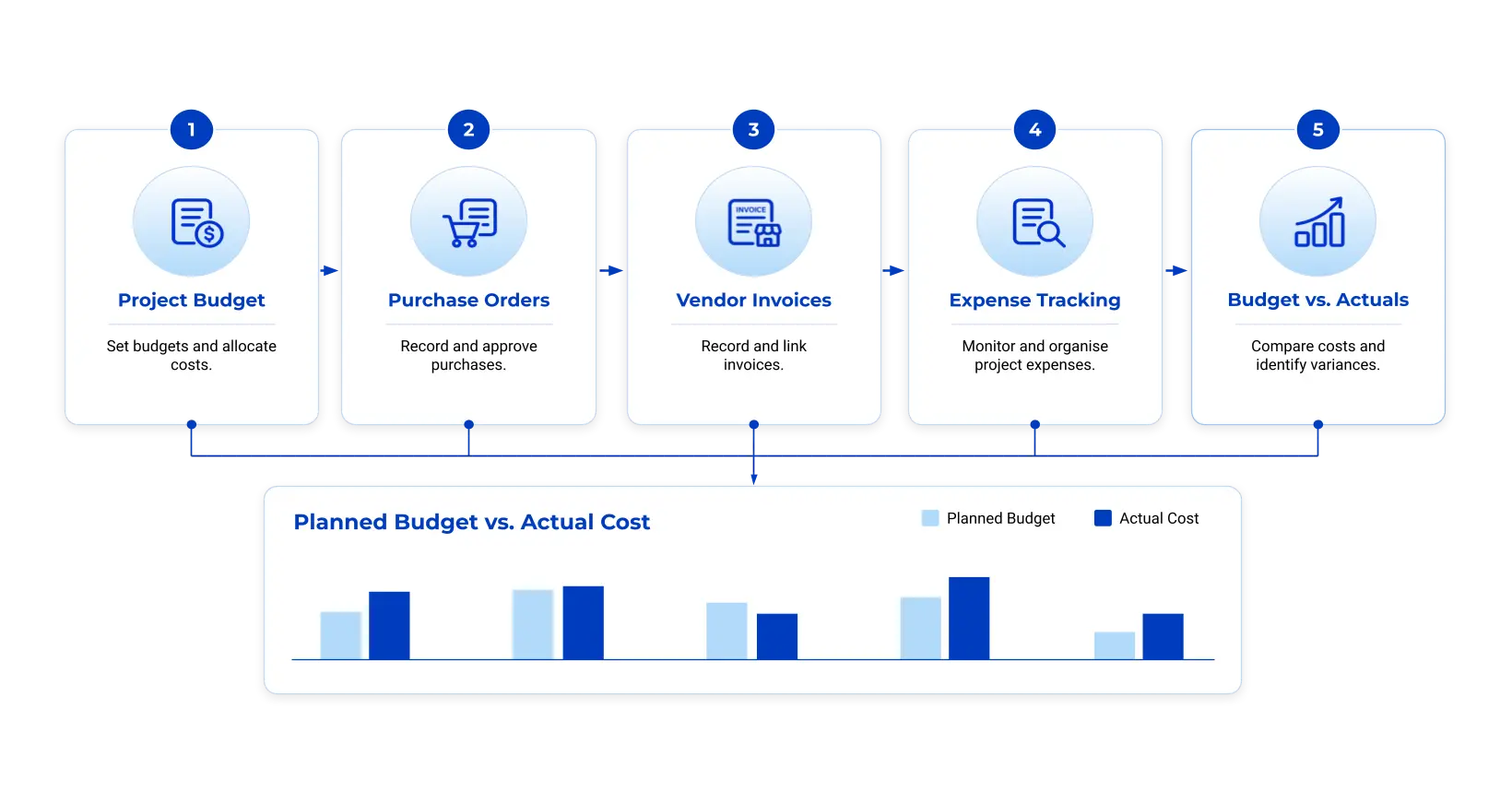
Project costs can influence profitability throughout a development’s lifecycle. Land-related expenditure, contractor invoices, materials, professional services, and other expenses need to be recorded and reviewed against approved budgets.
Business Central includes project management capabilities for project planning, resource usage, and cost tracking. According to Microsoft’s project management documentation, the platform supports project tasks, resource scheduling, budgeting, progress monitoring, and tracking resource usage.
These capabilities can provide a foundation for real estate project cost management. With the appropriate setup, organizations can organize project-related financial information, review recorded costs, and compare expenditure with budgets.
For example, a developer managing several residential projects could maintain separate project records and reporting categories. Finance teams could review recorded expenditure for each development and investigate significant differences from planned costs. This illustrates how Business Central project management can contribute to financial oversight when project records and reporting are configured appropriately.
However, ERP project accounting is not automatically a complete construction management system. Detailed construction scheduling, site progress tracking, contractor coordination, and quantity surveying may require specialist software or integrations.
3. Procurement and Vendor Management
Real estate businesses work with suppliers, contractors, service providers, and material vendors. Unclear purchasing procedures and disconnected records can make it difficult to track commitments, approvals, and supplier invoices.
Business Central supports purchasing processes, purchase orders, vendor records, invoice processing, and accounts payable. These capabilities can help organizations establish consistent purchasing procedures and maintain a clearer record of procurement activity.
A structured process can help teams:
- Record purchase orders and vendor transactions.
- Maintain supplier information and purchasing history.
- Review outstanding commitments and supplier invoices.
- Route transactions through defined approval workflows.
- Connect purchasing records with financial reporting.
For organizations managing multiple projects, assigning purchases to appropriate projects or cost categories can improve accountability. Approval limits and responsibilities should be established during implementation.
Tender management, contractor bidding, and construction-specific procurement may require additional functionality beyond standard ERP capabilities. Businesses should identify these requirements before deciding on the final solution scope.
4. Billing, Invoicing, and Cash Flow
Cash flow planning matters when project expenditure and customer receipts occur at different stages. Developers may use milestone-based collections, while property operators may manage recurring rental income, service charges, or other property-related transactions.
Business Central supports financial transactions, customer balances, invoicing, and cash flow-related processes. These features can help finance teams review outstanding receivables, upcoming payments, and recorded financial commitments.
The solution should reflect the organization’s actual billing model. Milestone billing for a development project differs from recurring rent calculations or service-charge allocation.
Businesses requiring advanced lease administration, tenant billing rules, rent escalations, or occupancy tracking should verify whether these functions are included in their proposed solution or require an industry-specific extension.
The objective is to connect relevant operational transactions with reliable financial records and reduce unnecessary manual reconciliation.
5. Asset Records and Property-Related Financial Information
Real estate businesses may need to track asset acquisition costs, capital expenditure, depreciation, and related financial information. Maintaining these records in a structured system supports accounting and long-term planning.
Business Central provides fixed asset management capabilities for recording assets, depreciation, and related transactions. These features can support finance teams in maintaining asset records and understanding their financial treatment.
The implementation should distinguish between assets used by the business, properties held for investment, inventory held for sale, and development costs. These categories may have different accounting and reporting requirements.
Businesses comparing real estate financial management software should also consider property valuation, lease administration, facilities maintenance, and investment portfolio analysis. These requirements may call for specialist applications or additional functionality beyond core ERP capabilities.
| Choosing ERP for Real Estate Businesses by Business Model
Not every real estate business needs the same system configuration. Requirements depend on the operating model, transaction volumes, reporting needs, and level of integration with existing applications.
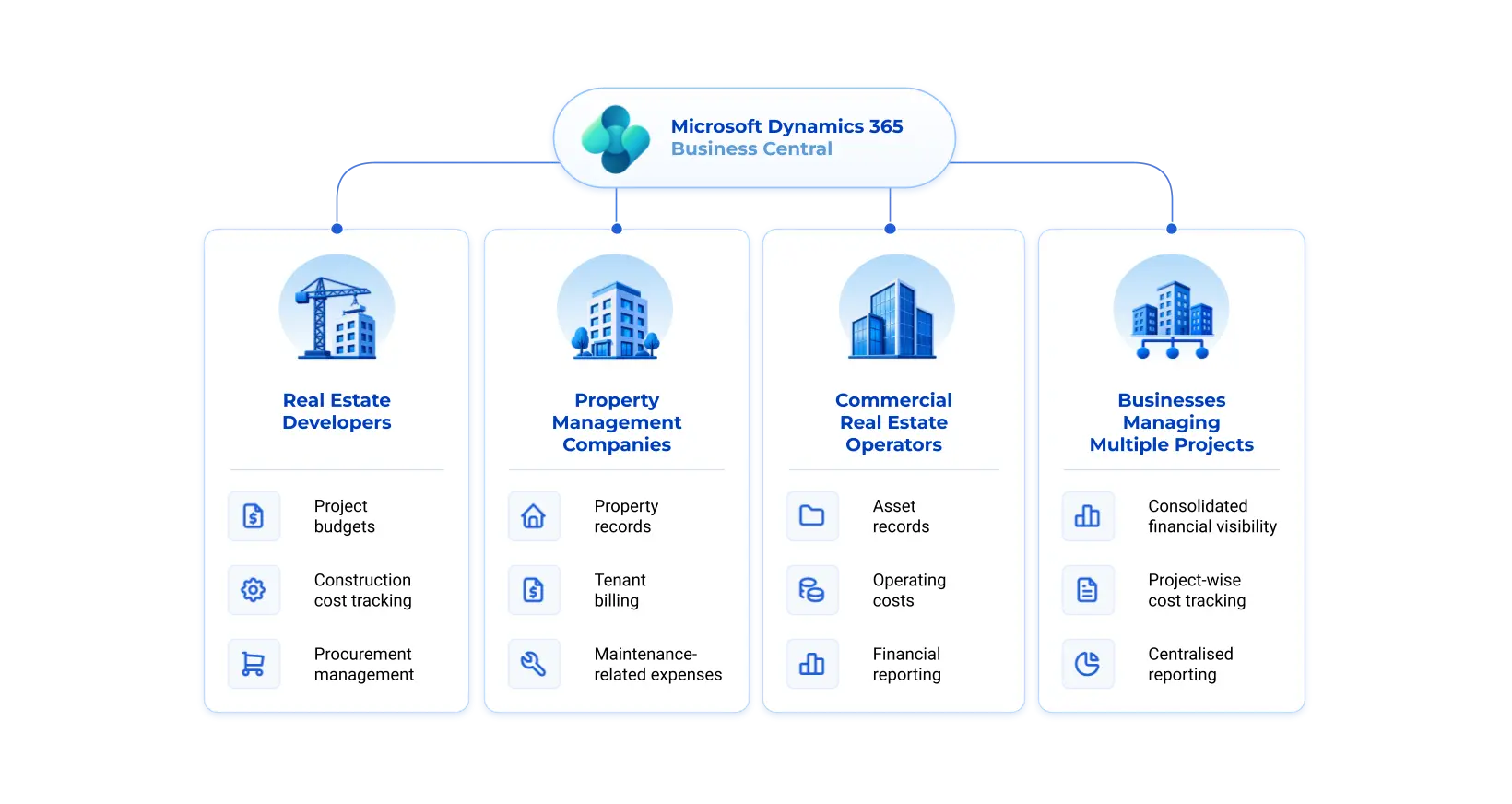
Real Estate Developers
Developers typically focus on development budgets, procurement, contractor costs, project-related financial reporting, and cash flow. Business Central may support core financial and purchasing processes, with construction-specific tools added where necessary.
Property Management Companies
Property management companies may need property-level financial reporting, recurring billing, vendor payments, tenant records, and maintenance coordination. ERP software for property management may need to integrate with dedicated lease administration or facilities management applications to cover these workflows.
Commercial Real Estate Operators
Commercial property operators may manage multiple locations, operating expenses, service contracts, and asset-related financial information. An ERP system can provide a financial foundation, while specialized applications may handle lease management and facilities operations.
Businesses Managing Multiple Projects
Organizations running several projects need consistent reporting structures and the ability to review financial results across projects. Business Central can support project-related financial tracking when project records, dimensions, permissions, and reporting are designed appropriately.
The right ERP for real estate approach should be based on these operating requirements, not solely on the number of features listed by a software vendor.
| What to Assess Before Implementing ERP for Real Estate
Selecting an ERP solution requires more than comparing software features. Organizations should evaluate their current processes and define what the system must support.
- Review existing workflows. Document how the business manages accounting, procurement, project costs, billing, vendor payments, and reporting. Identify duplicate data entry and manual reconciliation.
- Define reporting requirements. Establish how management needs to review results across properties, projects, entities, and departments. This will influence the chart of accounts, dimensions, and reporting design.
- Identify specialist requirements. List needs such as lease administration, tenant management, construction scheduling, site reporting, and facilities maintenance. Determine which can be addressed through standard functionality and which require extensions or integrations.
- Review integration needs. Assess connections with CRM systems, banking applications, document management platforms, property management tools, and reporting solutions.
- Plan data migration and user adoption. Review existing property records, vendor details, customer accounts, opening balances, and historical transactions. Define data ownership, migration rules, testing procedures, and role-based training.
- Establish implementation priorities. Start with processes that matter most to business performance. A phased rollout can help teams validate workflows, reports, and integrations before expanding the system.
A structured requirements assessment helps businesses understand what the ERP can address and where additional components may be necessary. Organizations comparing Dynamics 365 Business Central ERP with other platforms should evaluate these requirements against actual product capabilities rather than feature lists alone.
| How RealWin Supports ERP for Real Estate
RealWin 365 is Octaware Technologies’ real estate-focused solution built on Microsoft Dynamics 365, combining ERP and CRM capabilities to support business operations across the property lifecycle. It brings together key functions such as Property Management, Leasing Management, Outright Sales Management, Financial Management, CRM, and Broker/Agent Management, helping real estate businesses coordinate property operations, sales activities, customer relationships, and financial processes through a connected platform.
The solution also supports related business workflows, including lead tracking, property bookings, customer engagement, lease-related processes, document management, workflow automation, and digital approvals. By connecting these activities, RealWin 365 helps organizations improve operational visibility, reduce disconnected processes, and maintain more consistent business information. The specific functionality and implementation scope depend on business requirements and configuration.
For organizations evaluating ERP for real estate, RealWin 365 provides a platform for addressing core business management needs alongside property-specific workflows.
Explore RealWin 365 by Octaware Technologies to learn more about the real estate-focused solution. You can also review Octaware’s Real Estate and Construction solutions to understand the broader technology options relevant to the industry.
Industry research also reinforces the importance of disciplined investment decisions. Deloitte’s 2027 Commercial Real Estate Outlook discusses priorities and investment considerations shaping commercial real estate. Reliable financial and operational information can help businesses evaluate costs, assess performance, and prioritize improvements.
| Choosing the Right ERP for Real Estate
Real estate businesses need reliable financial information, structured procurement, project cost visibility, and reporting processes that can keep pace with their operations. The right ERP for real estate can connect these activities and reduce dependence on disconnected systems.
Microsoft Dynamics 365 Business Central offers a foundation for financial management, purchasing, reporting, and project-related processes. Its suitability depends on the organization’s requirements and whether additional property or construction applications are needed.
Looking for an ERP solution tailored to real estate operations? Explore RealWin 365 by Octaware Technologies, built around Microsoft Dynamics 365 Business Central. Contact Octaware Technologies to discuss your real estate ERP requirements and explore how RealWin 365 can support your business processes.